Calendar-date events versus cycle-day events
Learn when to use a fixed calendar date and when to use a cycle-day event in a cycle-aware planning calendar.
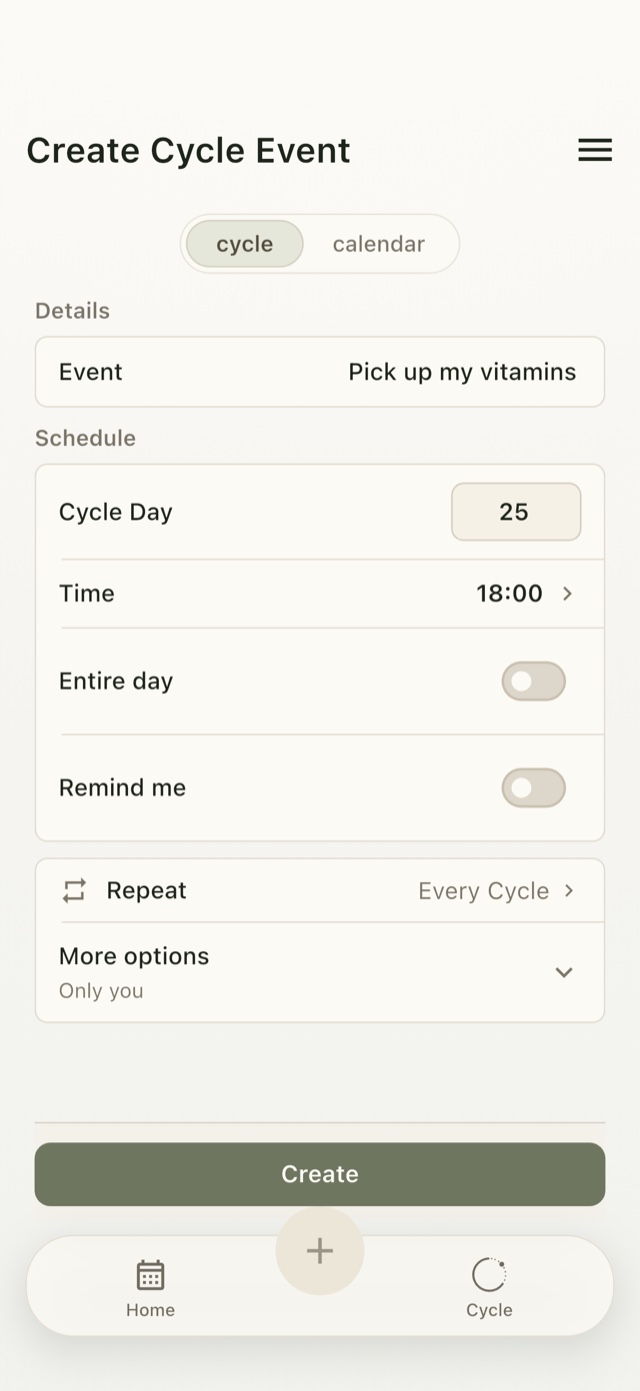
Use a cycle day for a plan that follows your cycle; use a date for a fixed commitment
A cycle-day event belongs to a day of your cycle, such as Cycle Day 25. Umorrow shows its estimated date in your calendar. A calendar-date event belongs to a fixed date, such as August 20. Both appear in the same calendar.
Actual Umorrow workflow
- Tap + in the Umorrow calendar to open the event form.
- Choose cycle for a plan that follows your cycle, or calendar for a fixed date.
- Enter the action and choose its Cycle Day or calendar date, then set the time.
- Choose the Repeat setting, enable Remind me if you want a notification, and tap Create.
- Review the event in the same calendar and timeline as other plans.
What changes when the cycle changes?
A fixed-date event stays on its chosen date. A repeating cycle-day event also appears on estimated dates for future cycles, even before the next cycle start is recorded. Recording a new start updates those estimates.
Cycle Day 25 is not the same as the 25th of every month. Its calendar date follows your cycle instead.
A simple decision rule
If another person, booking, ticket, deadline, or reservation names a date, use a calendar-date event. If the plan only makes sense as “day 8 of the current cycle,” use a cycle-day event. If both matter, keep the fixed commitment on its date and use cycle-day context to review the calendar.
Why Umorrow shows both
Ordinary calendars understand dates, but they do not usually represent a personal cycle day as its own planning coordinate. Traditional trackers show cycle days, but often center health logs rather than ordinary events. Umorrow combines the two planning views without treating an event as a symptom entry.
Plan by cycle day or calendar date
Create your Umorrow account to keep your plans in sync across devices. Available for iPhone and Android.